Property Sales → Agents → /property-sales/agents and Commissions → /property-sales/commissions Available
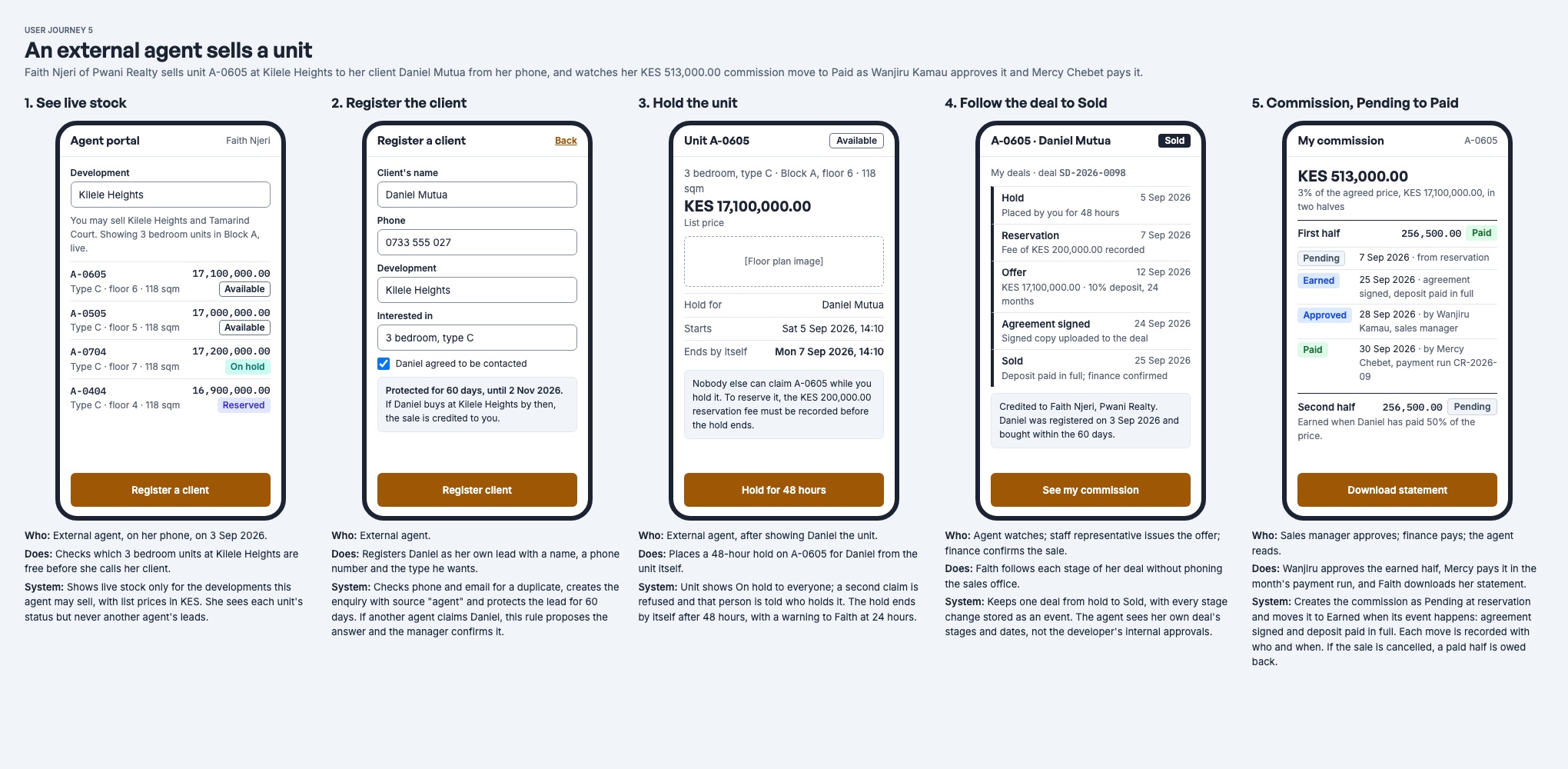
Commission follows the sale. It is created when a unit is reserved, earned in parts as the buyer signs and pays, approved by a sales manager, and paid in an agent payout run. If the sale falls through, it is reversed or clawed back.
The agent register
Register agent (needs Manage) adds a person or agency who may sell for you, and the developments they may sell.
| Kind | Who | Agent portal |
|---|---|---|
| Agent | An independent agent | Yes |
| Agency | An agency | Yes |
| Representative | A member of your own staff who earns commission | No: they use the staff screens |
An agent is active or suspended. A suspended agent loses access to the agent portal at once.
Edit on the agent page changes what they are (agent, agency or representative), their agency, the developments they may sell at, their status, tax PIN and note. The person or company itself cannot be changed. Changes apply to new sales; what the agent has already earned is kept.
Invite to agent portal, in the agent page's menu, sends an active agent or agency their sign-in link. See Buyer and agent portals.
The agent page shows the agent's developments, clients, deals, commission parts and a commission statement.
Who gets the credit
A deal is credited to the agent who brought the buyer:
- A client the agent registered in the agent portal. The client stays the agent's for the development's lead-protection period, 60 days by default.
- An enquiry through the agent's tracked link to the public listing page.
- The agent chosen when the unit is reserved.
When two agents claim the same buyer, the deal records a credit dispute. A sales manager decides who is credited, with a reason, on the Commissions screen.
Commission schemes
Each development has one commission scheme (needs Manage), which sets:
- The rate, a percentage of the sale price: the agreed price once there is an offer, the list price before.
- Tiers, optionally: a different rate for an agent's later sales on the development, by sale number.
- The parts: how the commission is split over the life of the sale, and when each part is earned.
A part can require any of:
- the agreement is signed;
- the deposit is paid;
- a percentage of the price is paid;
- the sale is paid in full.
The default scheme has two parts, each half the commission:
| Part | Earned when |
|---|---|
| Half at signed agreement and deposit | The agreement is signed and the deposit is paid. |
| Half when 50% of the price is paid | Half the agreed price has been paid. |
Amounts are rounded to the cent, and the parts always add up to the whole commission.
From reserved to paid
| Status | Meaning | Moved by |
|---|---|---|
| Pending | The sale has not yet met the part's conditions. | The commission check, every 15 minutes |
| Earned | The conditions are met. Not yet owed. | The commission check |
| Approved | A sales manager approved it. It is now owed to the agent and posted to the accounts. | A sales manager: Approve |
| Paid | The payout run that included it was paid. | The payout run |
| Reversed / Clawed back | The sale ended before or after it was paid. | The commission check |
- Nobody marks a part earned by hand. The commission check reads the deal's money and signature and moves each part when its conditions hold. It runs every 15 minutes, so a part can take up to that long to show as earned after a payment.
- Approving needs Manage. An approved part posts Dr 5265 Sales commission expense / Cr 2110 Accounts payable.
- Approvals (
/property-sales/approvals) lists every earned part waiting for approval, with waiting discounts, payout runs and credit disputes. Parts can also be approved from the Commissions screen and the agent page.
Paying agents: payout runs
Start a payout run on the agent page starts a commission payout for a period, From and To. It needs permission to create payout runs. Before Start the run, the dialog previews what the run will do: each part it pays, anything owed back, tax withheld, and the To pay total. The run is then approved and disbursed like any other payout run in Nyumba Zetu, and the person who started it cannot approve it.
- A run pays every approved part not yet paid: Dr 2110 Accounts payable / Cr Bank.
- Any clawback the agent owes is deducted from the run.
- Commission runs are separate from owner payout runs. Commission never appears in a landlord's run, and a landlord's rent never appears in an agent's.
- One run per agent per period: starting it twice does not pay twice. The preview says so when a run already covers the period.
When a sale is cancelled or ends
| Part's status when the deal closes | What happens | Journal |
|---|---|---|
| Pending or earned | Dropped. Nothing was posted. | None |
| Approved, not yet paid | Reversed. | Dr 2110 / Cr 5265 |
| Paid | Clawed back: deducted from the agent's next payout run. | Dr 2110 / Cr 5265 |
The agent sees parts owed back in the agent portal and on their commission statement.
What the agent sees
In the agent portal the agent sees their commission parts, totals, anything owed back, and can download their commission statement as a CSV file. See Buyer and agent portals.
The full accounting, with a worked example, is in Payment plans, receipts and accounting.