Property Sales → /property-sales
The other Property Sales guides describe one screen or one rule at a time. This page follows the work instead. Each journey below is one piece of the job, done from start to finish by the people who do it. At every step it says who acts, what they do, and what Nyumba Zetu does in response.
| # | Journey | People |
|---|---|---|
| 1 | Set up a development for sale | Sales manager |
| 2 | From enquiry to reserved unit | Buyer, representative |
| 3 | From reservation to signed sale | Representative, sales manager, buyer |
| 4 | A buyer pays an instalment | Buyer, finance |
| 5 | An external agent sells a unit | Agent, sales manager, finance |
| 6 | A reservation lapses, and a sale is cancelled | System, sales manager, finance |
1. Set up a development for sale
Wanjiru Kamau, the sales manager, sets up Kilele Heights once: its unit types, its units, their prices and the rules they sell under. When she is done, the units appear on the availability board, ready for her team to sell.
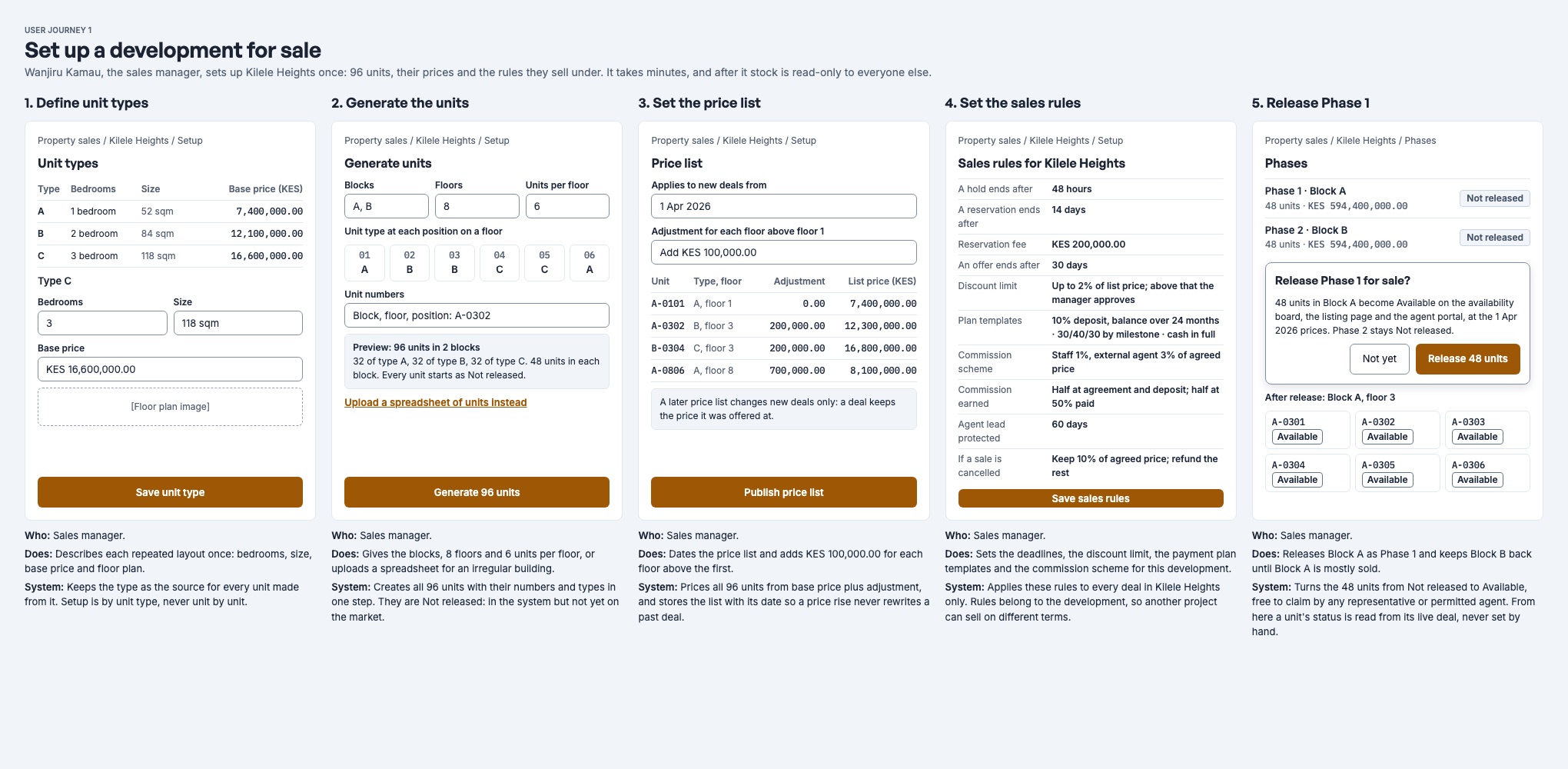
Describe each unit type once
- Who: Sales manager, in Setup.
- Does: Adds each repeated layout, such as 2 Bedroom Garden, with its bedrooms, size and base price.
- Nyumba Zetu: Uses the type as the starting point for every unit built from it. Setup is done by type, never unit by unit.
Generate the units
- Who: Sales manager.
- Does: Generates units by block and floor, or uploads a spreadsheet for an irregular building.
- Nyumba Zetu: Creates every unit with its number and type in one step. Each new unit is Not released: it exists, but it is not on sale yet.
Set the sales rules
- Who: Sales manager.
- Does: Sets the hold, reservation and offer lengths, the maximum discount, the lead-protection period and the commission scheme.
- Nyumba Zetu: Applies these rules to deals in this development only, so another project can sell on different terms.
Publish a price list
- Who: Sales manager.
- Does: Fills a price list from the type prices, adjusts where needed and publishes it.
- Nyumba Zetu: Stores the list with its date. A later list changes new deals only: every deal keeps the price it was offered at.
Release the first phase
- Who: Sales manager.
- Does: Releases Phase 1 and keeps Phase 2 back.
- Nyumba Zetu: Turns the phase's units from Not released to Available on the board. From here a unit's status comes from its live deal. Nobody sets it by hand.
Full detail: Developments, units and prices.
2. From enquiry to reserved unit
Grace Wambui fills in the enquiry form on Kilele Heights's listing page. Achieng Odhiambo, a sales representative, takes her from that enquiry to a reserved three-bedroom unit, without typing her details in again.
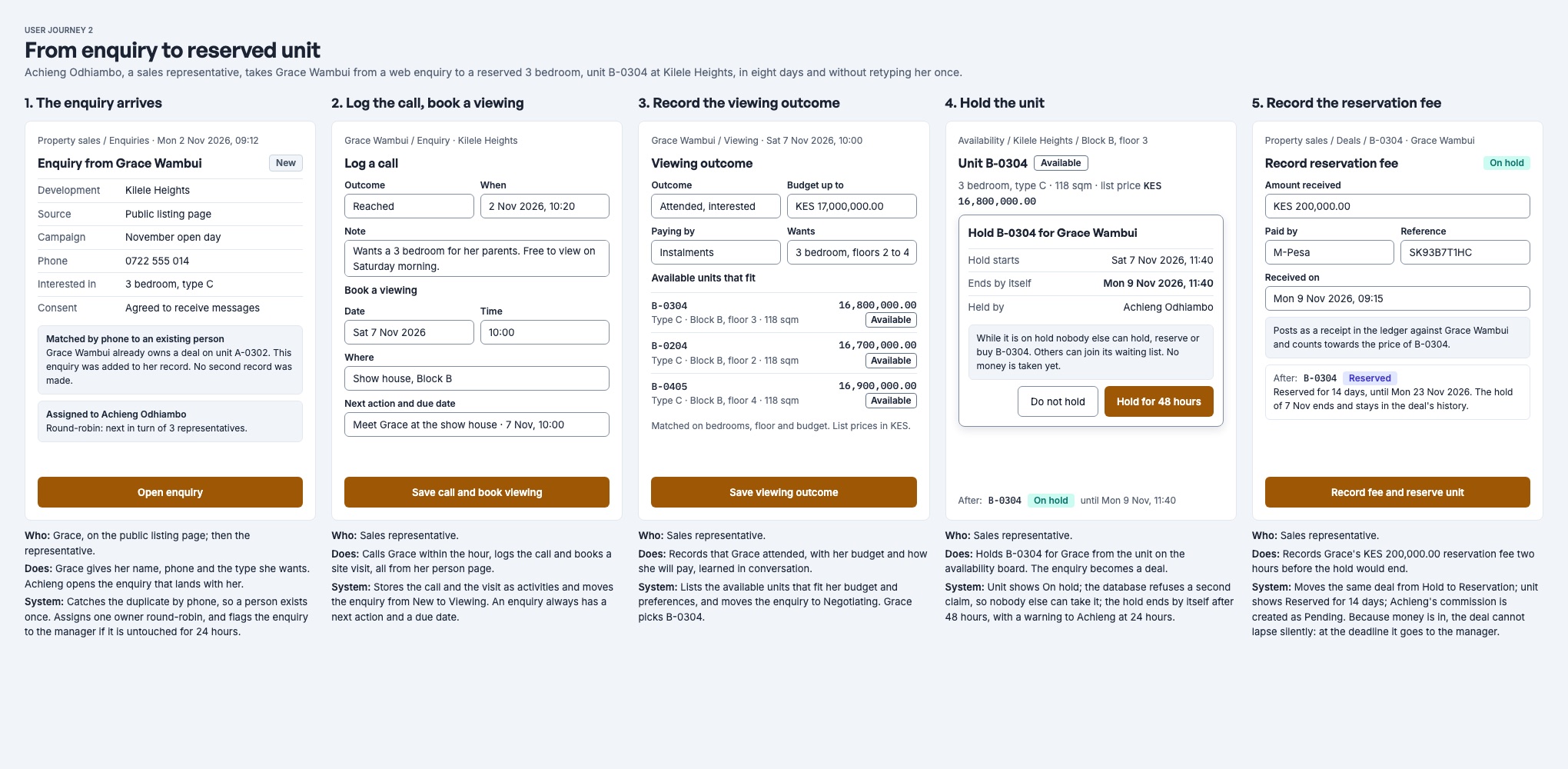
The enquiry arrives
- Who: Grace, on the listing page. Then the representative.
- Does: Grace gives her name, phone number and the kind of home she wants.
- Nyumba Zetu: Looks for Grace by phone, then by email, so one person never has two records. Gives the enquiry to the next representative in turn, Achieng, and sends her an in-app notice, New enquiry for Kilele Heights. If nobody acts within the untouched-enquiry time (24 hours by default), the enquiry is flagged as Untouched.
Call and book a viewing
- Who: Representative, from Grace's person page.
- Does: Logs the call, then books a site visit for Saturday with a next action and a due date.
- Nyumba Zetu: Logging the call moves the enquiry from New to Contacted. The booked visit is a viewing; it moves the enquiry to Viewing once its outcome is recorded.
Record the viewing and find units that fit
- Who: Representative.
- Does: Records that Grace came, and what she wants and can spend.
- Nyumba Zetu: Lists the available units that match her bedrooms and budget on her person page. Grace chooses B-0304.
Hold the unit
- Who: Representative, from the board or the enquiry.
- Does: Holds B-0304 for Grace.
- Nyumba Zetu: Turns the enquiry into a deal and marks the enquiry Converted. B-0304 shows On hold to everyone, and nobody else can hold, reserve or sell it. The hold lasts 48 hours by default, and Achieng gets a warning 24 hours before it ends.
Reserve it with a fee
- Who: Representative.
- Does: Reserves the unit and enters Grace's reservation fee of KES 200,000.00.
- Nyumba Zetu: Moves the same deal from Hold to Reservation, with 14 days on the clock by default. The fee is invoiced at once and counts towards the price. Grace pays it by M-Pesa or bank to the sale's P reference, and the payment is matched to the bill automatically. Once any money is on the deal, it can no longer lapse quietly: at the deadline it goes to a manager.
Full detail: Enquiries and lead assignment.
3. From reservation to signed sale
Achieng, the representative, and Wanjiru, the sales manager, turn Grace's reservation into a signed sale, with a dated payment plan she can follow.
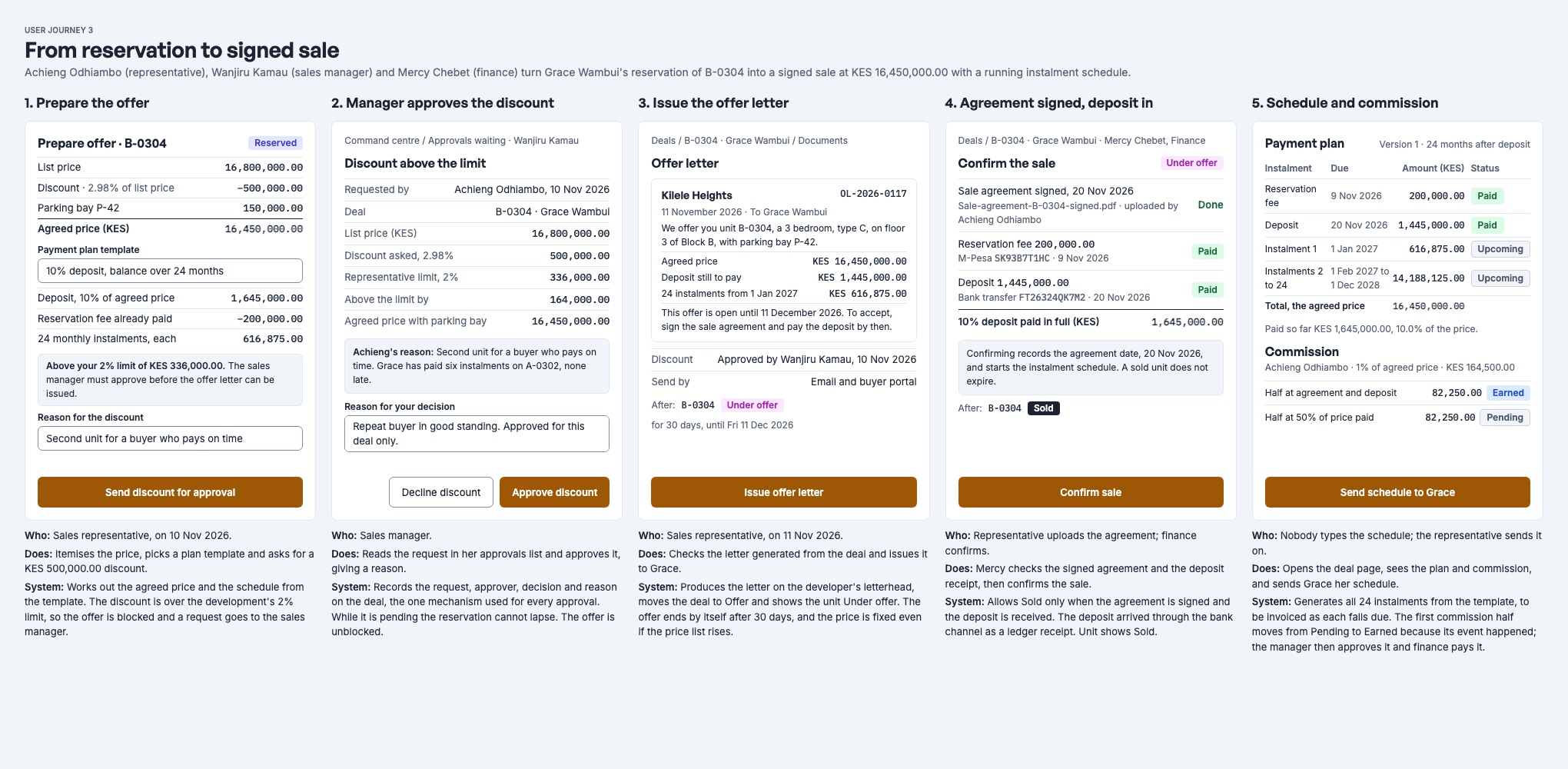
Prepare the offer
- Who: Representative.
- Does: Opens Make offer, enters the agreed price and builds the payment plan: the reservation fee, a deposit and monthly instalments. Grace has asked for a discount of KES 500,000.00, which is above the development's limit, so Achieng uses Request discount and gives a reason.
- Nyumba Zetu: Checks that the fee and the instalments add up to the agreed price, to the cent. Because the discount is above the limit, nothing is offered or invoiced yet. Every sales manager except Achieng gets Discount waiting for approval. While the request waits, the reservation cannot lapse.
The manager approves the discount
- Who: Sales manager, from Approvals.
- Does: Opens the deal, reads the reason and approves it.
- Nyumba Zetu: Makes the offer exactly as requested and records Wanjiru as the approver. Achieng gets Discount approved. Nobody can approve their own request.
Issue the offer letter
- Who: Representative.
- Does: Selects Issue offer letter.
- Nyumba Zetu: Creates a numbered PDF with the agreed price, the plan and an "open until" date, files it on the deal and emails it to Grace. The unit shows Under offer for 30 days by default.
Agreement signed, deposit paid
- Who: Representative records the signature. Grace pays the deposit.
- Does: Achieng uses Record signed agreement with the date Grace signed. Grace pays the deposit to the P reference.
- Nyumba Zetu: Moves the deal to Sold by itself the moment both are true: the agreement is signed, and the fee and every deposit instalment are paid in full. A Sold deal has no deadline.
Schedule and commission
- Who: Nobody types the schedule.
- Does: Achieng sends Grace a statement from the deal.
- Nyumba Zetu: Invoices each instalment on its due date. If an agent is credited, the commission check moves the first part of their commission from Pending to Earned once its conditions are met. A manager then approves it.
Full detail: Reservations, offers and the deal lifecycle.
4. A buyer pays an instalment
An instalment on Grace's plan falls due. She pays it, and Mercy Chebet in finance sees it on the deal without entering anything.
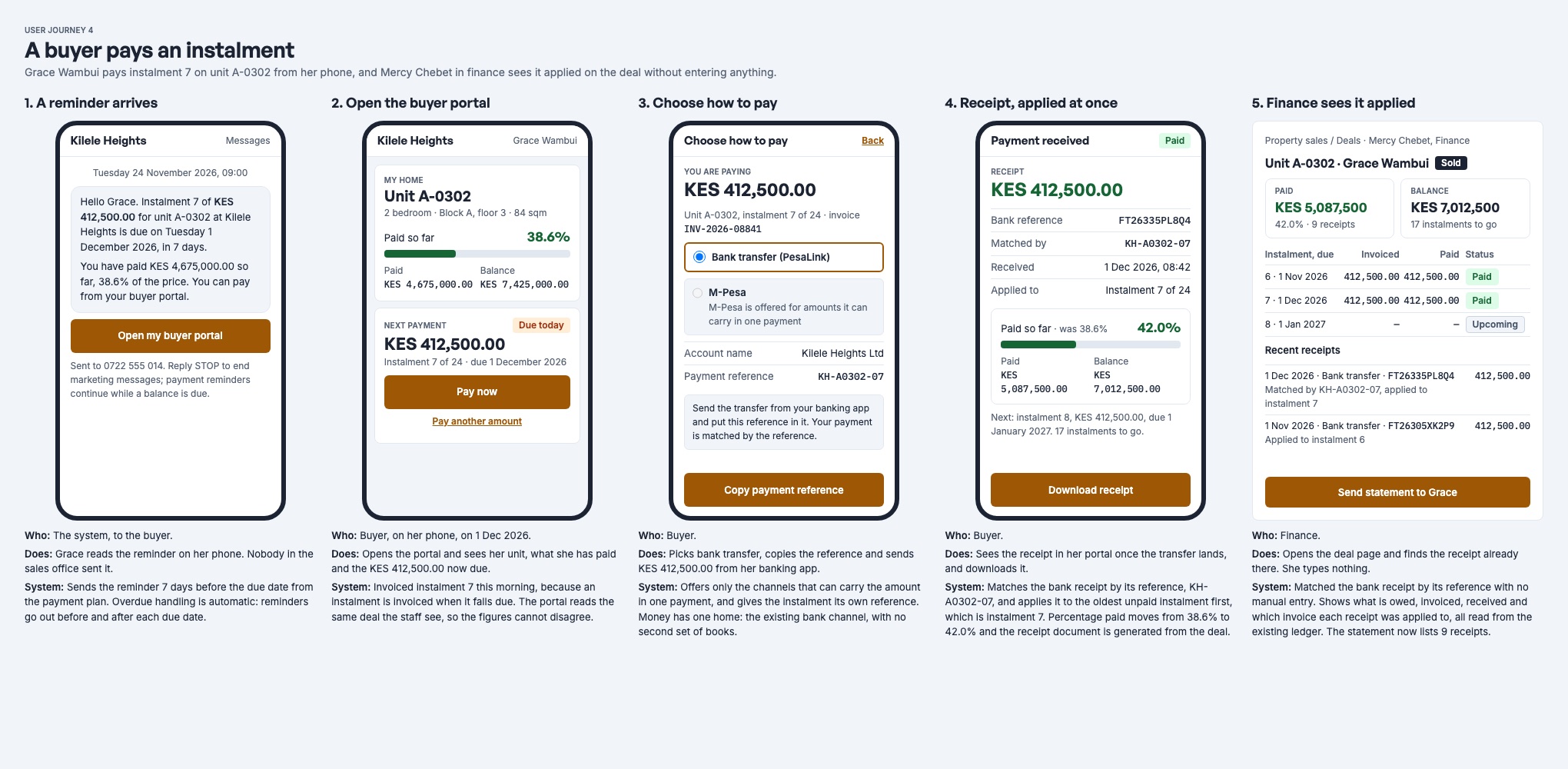
The instalment is invoiced
- Who: Nyumba Zetu.
- Does: Nobody in the sales office acts.
- Nyumba Zetu: The daily invoicing job raises the instalment's bill on its due date (or the agreed number of days before). If the development sends monthly statements, Grace receives one on the 1st.
Grace checks her buyer portal
- Who: Buyer, on her phone.
- Does: Signs in with a link and a six-digit code, with no password.
- Nyumba Zetu: Shows her home, what she has paid and owes, the next payment and the sale's payment reference. The portal reads the same deal the staff see, so the figures always match.
Grace pays
- Who: Buyer.
- Does: Pays the bill from the portal, which sends an M-Pesa prompt to her phone. She could also pay to the paybill or bank account with the P reference.
- Nyumba Zetu: Matches the payment to the sale by its reference, when automatic reconciliation is on for the branch, and applies it to the sale's bills.
Finance sees it applied
- Who: Finance.
- Does: Opens the deal page. There is nothing to type.
- Nyumba Zetu: Shows each instalment's amount, what was invoiced, what was paid and the balance, with the recent receipts. Money that no bill has taken yet shows as Buyer credit, ready to apply.
Full detail: Payment plans, receipts and accounting and Buyer and agent portals.
5. An external agent sells a unit
Faith Njeri, an agent with Pwani Realty, brings her client Daniel Mutua to Kilele Heights and follows her commission from her phone until it is paid.
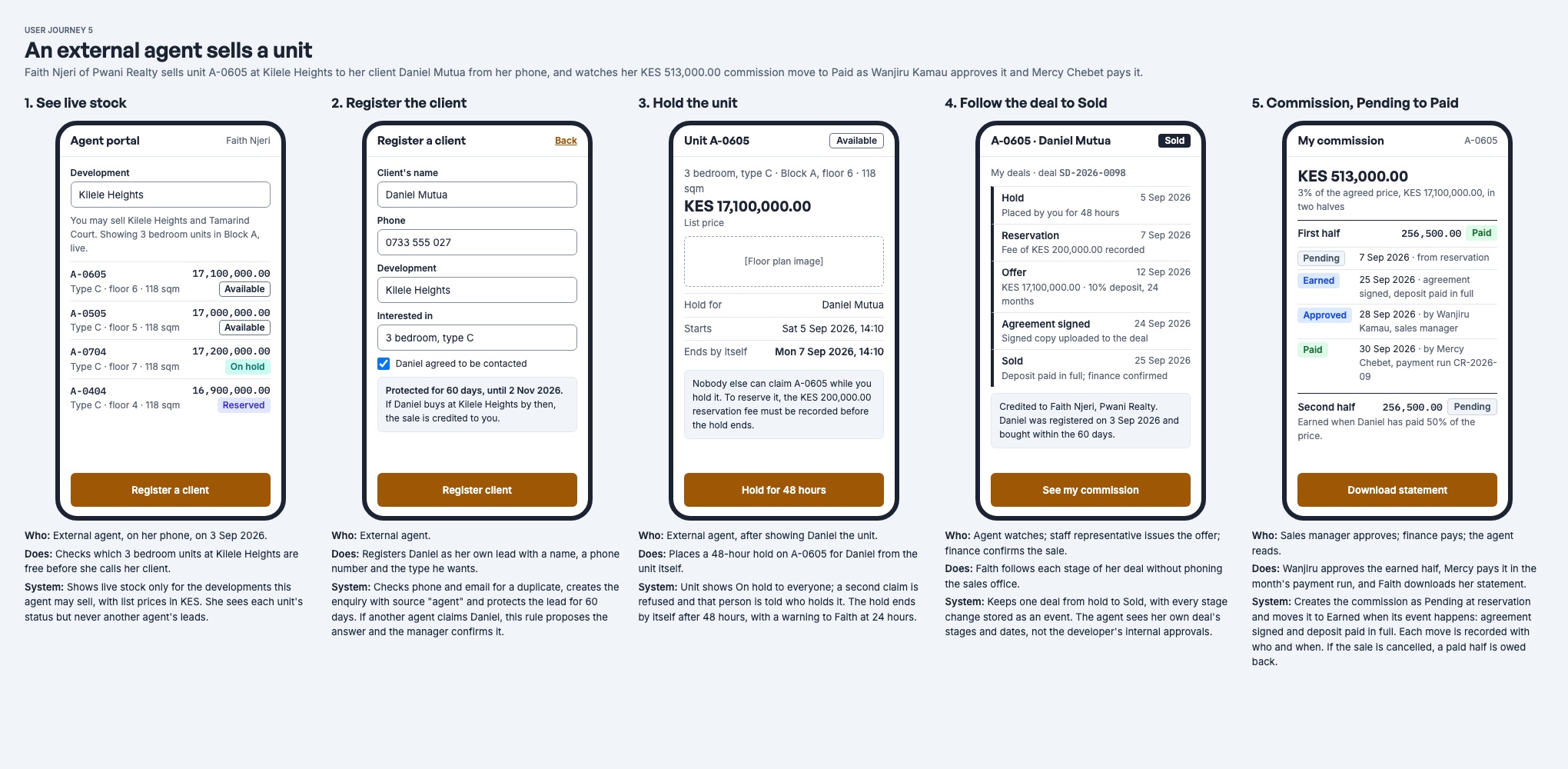
See live stock
- Who: Agent, in the agent portal.
- Does: Checks which units are free before calling her client.
- Nyumba Zetu: Shows only the developments Faith may sell, with today's prices and each unit's status. She never sees who holds or bought a unit, or another agent's clients.
Register the client
- Who: Agent.
- Does: Registers Daniel with his name and phone number.
- Nyumba Zetu: Creates the enquiry, gives it to the next representative in turn, and credits Daniel to Faith for the development's lead-protection period, 60 days by default. If another agent claims Daniel, the deal records a credit dispute for a sales manager to decide.
Hold the unit
- Who: Agent, after showing Daniel the unit.
- Does: Holds the unit for Daniel from the agent portal.
- Nyumba Zetu: The unit shows On hold to everyone for 48 hours by default. The representative carries the deal on from here: reservation, offer and agreement, as in journeys 2 and 3.
Commission moves from Pending to Paid
- Who: Nyumba Zetu, then the sales manager, then finance.
- Does: Wanjiru approves each earned part. Mercy includes it in the agent's payout run.
- Nyumba Zetu: Works out the commission when Daniel reserves, split into parts by the development's scheme. By default that is half when the agreement is signed and the deposit is paid, and half when 50% of the price is paid. The commission check moves each part to Earned when its conditions hold (it runs every 15 minutes). An approved part is posted to the accounts, and a paid payout run marks it Paid. Faith sees every part in the agent portal and can download a statement.
Full detail: Agents and commissions.
6. A reservation lapses, and a sale is cancelled
A unit comes back on sale in one of two ways. A deal with nothing on it lapses by itself, and the system needs no help. A deal with money or a signature on it must be cancelled by a manager, and finance settles the money.
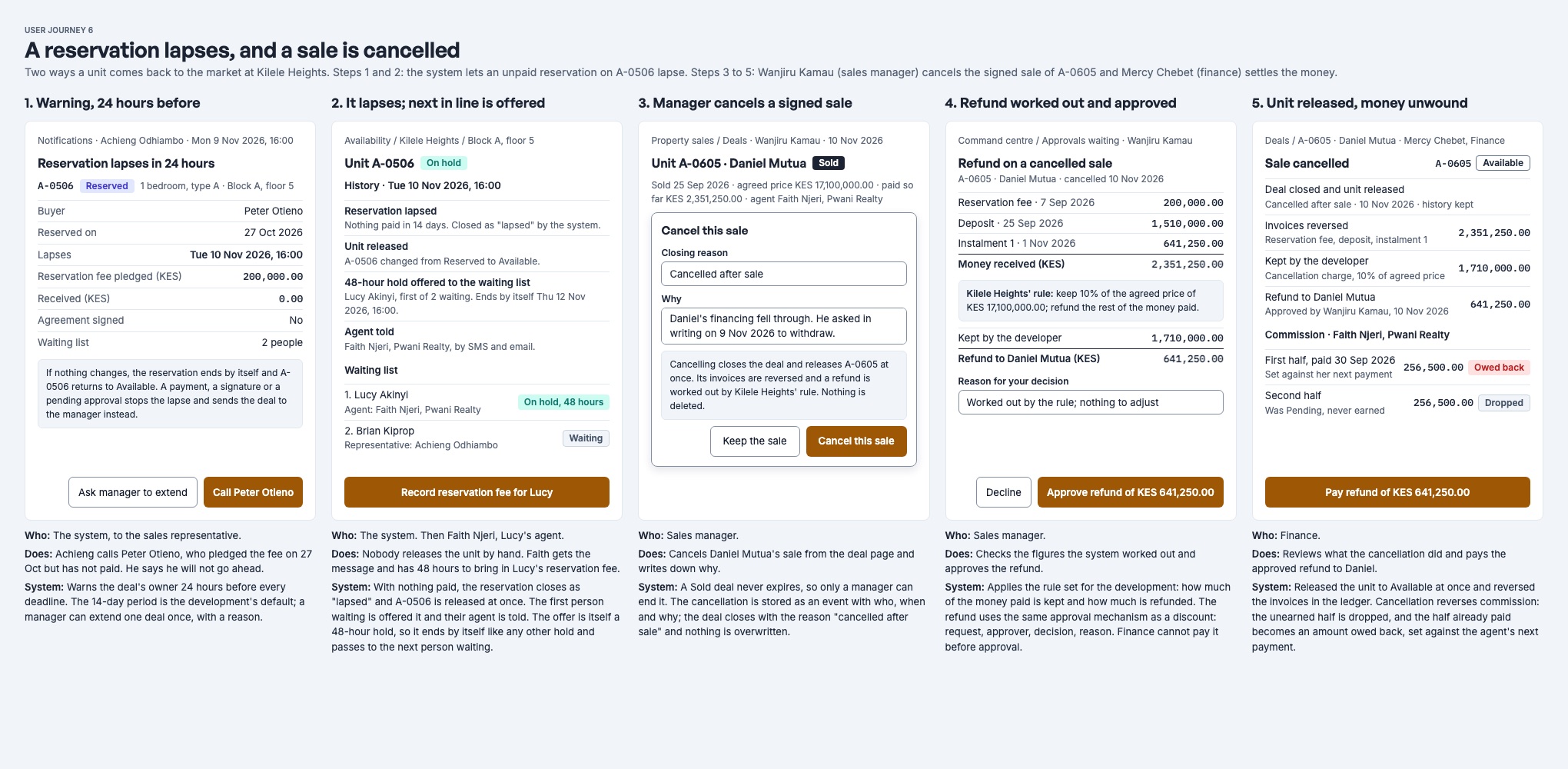
A reservation lapses
A warning, 24 hours before
- Who: Nyumba Zetu, to the deal's owner.
- Does: Achieng calls the buyer, who has not paid the fee and decides not to go ahead.
- Nyumba Zetu: Sends an in-app notice 24 hours before every hold, reservation and offer deadline. A manager can extend a deadline once per stage, with a reason.
It lapses, and the next person waiting is offered the unit
- Who: Nyumba Zetu.
- Does: Nobody releases the unit by hand.
- Nyumba Zetu: With nothing paid, nothing signed and no discount waiting, the deal closes as Lapsed and its unpaid bills are cancelled. If someone is on the unit's waiting list, the unit is held for the first person in line, and whoever added them is told. That hold lapses like any other, and the unit then passes to the next person waiting.
A signed sale is cancelled
The manager cancels the sale
- Who: Sales manager, from the deal page.
- Does: Selects Cancel sale and writes down why.
- Nyumba Zetu: A deal with money or a signature on it never lapses, so only a manager can end it. The cancellation goes into the deal's history with who, when and why, and the unit returns to sale at once.
The forfeit is worked out
- Who: Nyumba Zetu.
- Does: Nobody calculates anything by hand.
- Nyumba Zetu: Applies the development's forfeit rule: the developer keeps a percentage of the price (with an optional minimum), never more than the buyer has paid. A forfeit bill is raised and paid from the buyer's receipts. Whatever is left stays as credit on those receipts, in Unapplied receipts (2240).
Finance refunds the buyer
- Who: Finance, told by the manager.
- Does: Refunds the credit from Payments, receipt by receipt.
- Nyumba Zetu: Refunds nothing by itself. The refund due is on the deal's history.
Commission is unwound
- Who: Nyumba Zetu.
- Does: Nobody adjusts commission by hand.
- Nyumba Zetu: Parts not yet paid are Reversed. A part already paid is Clawed back: it becomes an amount the agent owes, deducted from their next payout run.