Property Sales → Deals → /property-sales/deals and the Availability board Available
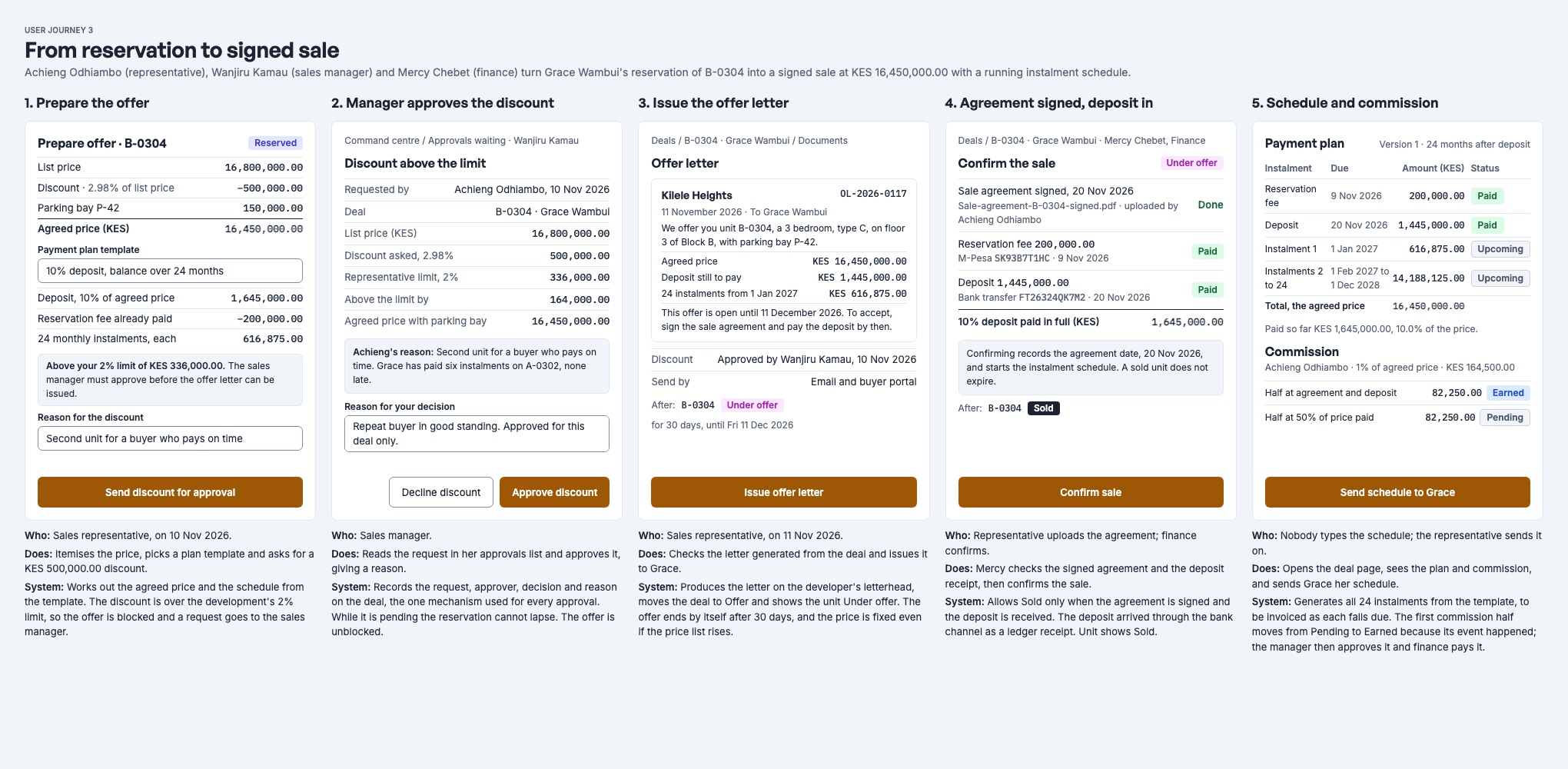
A deal is one buyer's claim on one unit. It moves through five stages. Three of them, Hold, Reservation and Offer, run against a deadline; the deal page shows exactly which actions you may take at each point.
The stages
| Stage | Unit shows | Deadline (default) | How a deal gets here | Who |
|---|---|---|---|---|
| Hold | On hold | 48 hours | Hold on the board, from an enquiry, or an agent in the agent portal. No fee. | Rep |
| Reservation | Reserved | 14 days | Reserve from the board, or Reserve on a hold. Needs a fee above zero. | Rep |
| Offer | Under offer | 30 days | Make offer with the agreed price and payment plan. | Rep (Manager above the discount limit) |
| Sold | Sold | None | Automatic: the agreement is signed and the deposit is paid. | System |
| Completed | Completed | None | Hand over keys, once the sale is paid in full and the checklist is done. | Manager |
Every change is written to the deal's history, which cannot be edited: who did what, when, and why. Deal references look like SD-2026-0003.
1. Hold
A hold keeps a unit for a buyer while they decide. It needs:
- an active development;
- a released unit with a price;
- no other live deal on the unit.
Holding from an enquiry marks that enquiry Converted.
2. Reservation and the fee
Reserving asks for the reservation fee. The fee is part of the price, not an extra.
- The fee is invoiced at once, due today, on the deal's sale contract. Every bill and receipt for the sale hangs off that contract. See Payment plans, receipts and accounting.
- The buyer pays it through Payments: M-Pesa paybill or bank to the sale's P reference, or a receipt recorded by staff. A fee cannot be ticked as "received" by hand once it is on the ledger; the receipt is the proof.
- The reservation's deadline starts again: 14 days by default.
3. Offer and payment plan
Make offer builds the price and the plan:
- Agreed price: the list price, less any discount.
- Payment plan: the reservation fee plus dated instalments. Each instalment is a deposit, an instalment or the balance. It is paid by the buyer or by a named lender (a mortgage or bank line).
- The rule: the fee plus every instalment must add up to the agreed price exactly, to the cent. Every due date must be today or later.
Making the offer starts its deadline: 30 days by default.
Discounts and approval
Each development has a maximum discount.
- Within the limit: the representative makes the offer.
- Above the limit, by a representative: they Request discount with a reason. Nothing is
offered or invoiced yet, and the reservation cannot lapse while it waits.
- Every sales manager except the requester gets an in-app notice, Discount waiting for approval.
- A manager opens the deal and Approves: the offer is made exactly as requested. Or they Decline, with a reason.
- The representative is told either way.
- Nobody can decide their own request.
- Above the limit, by a manager: the manager may make the offer directly, with a reason. The deal records them as its approver.
Waiting discounts are listed on Approvals (/property-sales/approvals); Review opens the
deal, where the manager decides.
Offer letter
Issue offer letter creates a numbered PDF (OL-2026-0007). It states the agreed price, the plan and an open until date: the end of the offer's deadline. The letter reads: "To accept, sign the sale agreement and pay the deposit by then."
The PDF is filed on the deal and emailed to the buyer with the letter attached. A buyer who has opted out of email, or has no address, is shown as not sent.
4. Signed agreement
When the buyer signs, the representative records it with Record signature, giving the date signed. The date may be in the past but not in the future. The sale contract becomes active.
5. Sold, automatically
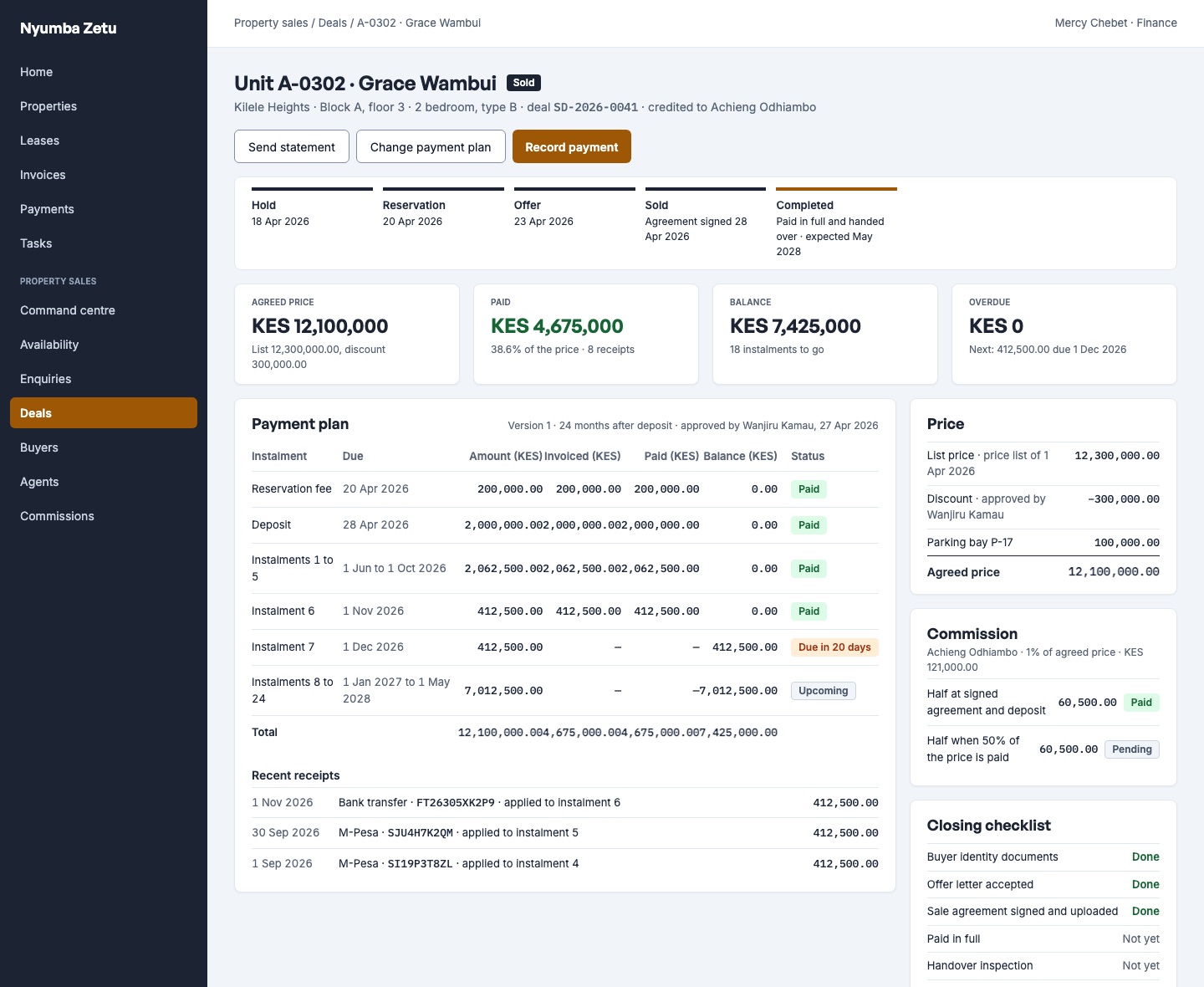
A deal becomes Sold the moment both are true, whichever comes last:
- the agreement is signed;
- the reservation fee and every deposit instalment are invoiced and paid in full.
From Sold onwards there is no deadline. A manager can still Change plan on a signed sale, with a reason. A plan is never edited in place: a new version replaces it, and instalments already invoiced carry over unchanged.
6. Handover and completion
The Handover section on the deal is a checklist.
| Step | Ticked by |
|---|---|
| Offer accepted | Automatically |
| Agreement signed | Automatically |
| Paid in full | Automatically |
| Identity documents | A person |
| Inspection | A person |
| Title documents lodged | A person |
| Title fees paid | A person |
| Title issued | A person |
| Defects closed | Automatically, once every defect is closed |
| Keys handed over | The final step |
Record defects found at inspection on the deal. Hand over keys is a sales manager's action. It is refused while any step is outstanding or the sale is not paid in full. Handing over completes the deal and recognises the sale's revenue in the books.
When a deal ends early
| Ending | When | Who | What happens to money |
|---|---|---|---|
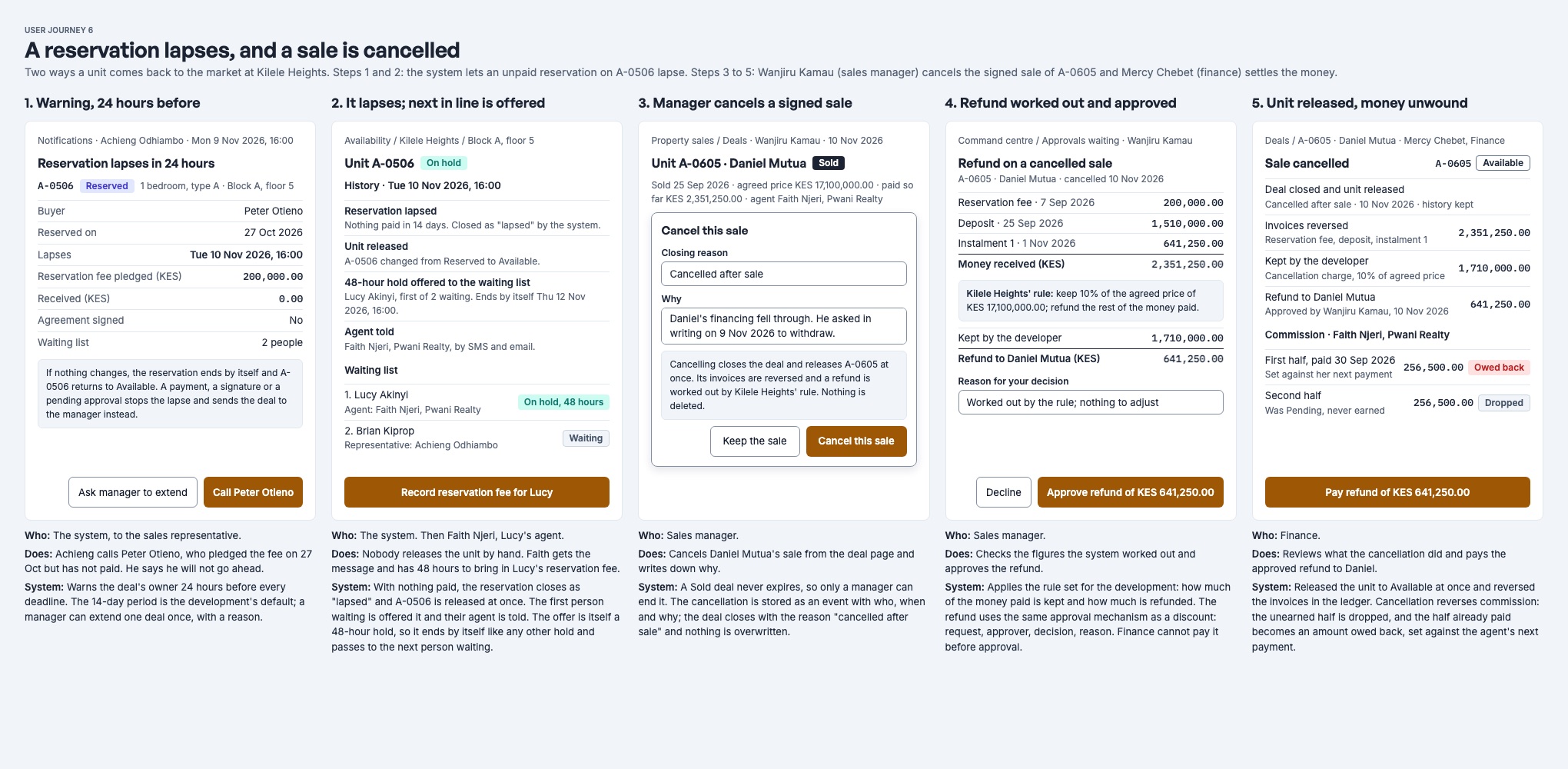
| Lapsed | A hold, reservation or offer passes its deadline with nothing paid, nothing signed and no discount waiting. | The system | Unpaid bills are voided. |
| Released | The buyer withdrew or declined, and nothing has been paid. | The deal's owner, or a manager | Unpaid bills are voided. |
| Moved | The buyer wants another unit in the same development, and nothing has been paid. | The deal's owner, or a manager | The old deal closes; a new one opens on the other unit. |
| Cancelled | The buyer has paid something, or the agreement is signed. | A manager, with a reason | Bills are voided, the forfeit is kept, and the rest is left for finance to refund. See cancellation money. |
Deadlines that would not lapse
If a deadline passes but money has been received, the agreement is signed or a discount is waiting, the deal is kept, not lapsed. The system stops counting down and tells the development's sales managers once. A manager then decides: extend, cancel or carry on.
- Extend: a manager can extend a hold, reservation or offer once, by a number of hours, with a reason.
- Warning: the deal's owner gets an in-app notice 24 hours before any deadline.
Waiting list
A buyer who wants a unit that is already taken can join its waiting list. When the unit's deal closes for any reason, it lapses, is released, moved or cancelled, the unit goes to the first person waiting:
- They are given a hold automatically, for the development's hold length.
- The representative who added them gets an in-app notice that the unit is held for them.
- If they reserve, their place becomes converted. If the hold lapses, the unit passes to the next person waiting.
A person can leave the list while they are waiting. The person who added them, or a manager, can remove them.
Documents and paperwork
Each deal keeps its documents: the signed agreement, offer letters, identity documents and anything else uploaded. Paperwork fills the deal's details into your templates. The buyer sees the signed agreement and newest offer letter in the buyer portal once they have been uploaded and checked for viruses.