Property Sales → Enquiries → /property-sales/enquiries · needs Sell to change Available
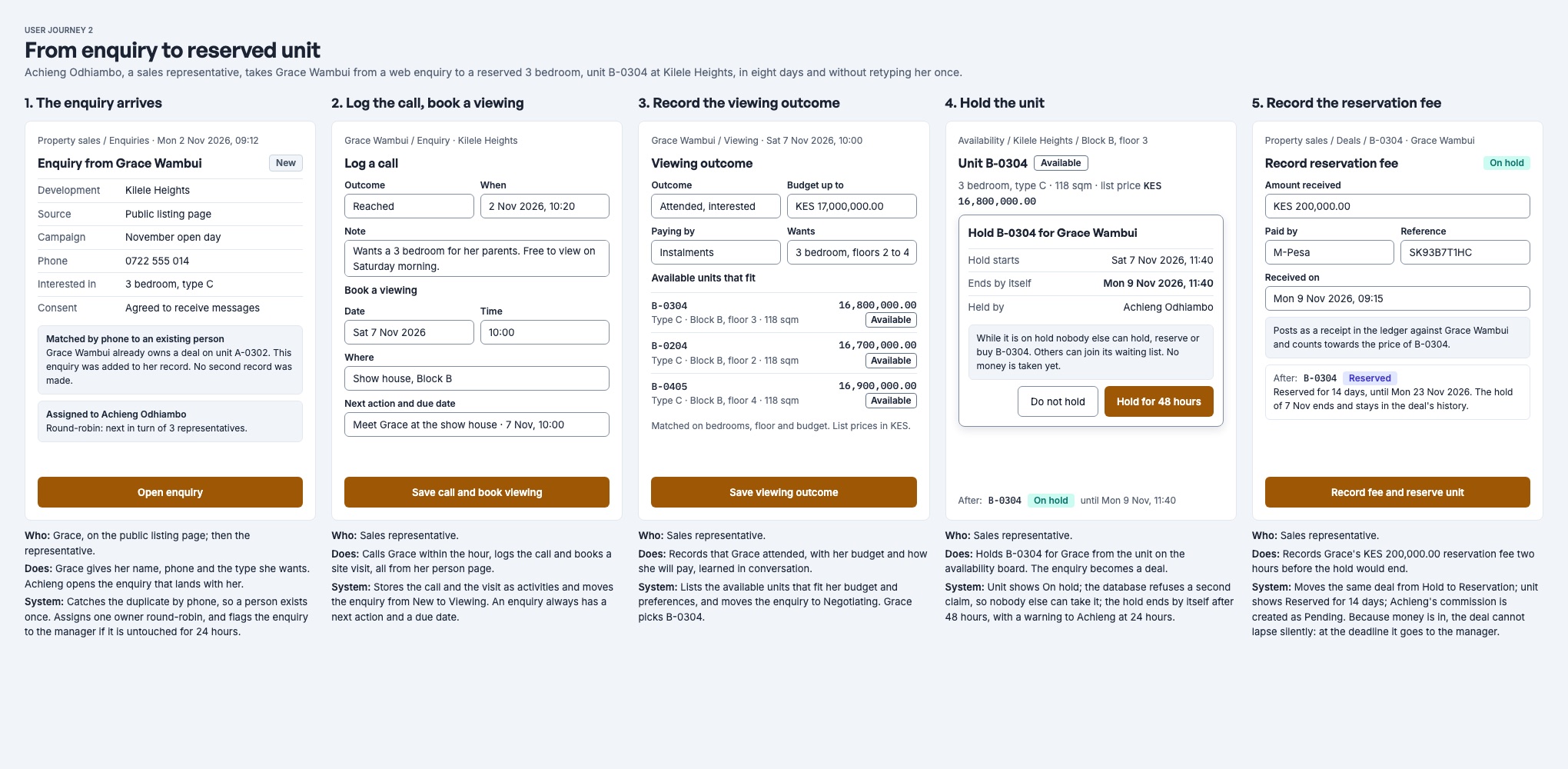
An enquiry is one person's interest in one development. It starts at New, is followed up, and ends either Converted, when a unit is held or reserved for it, or Lost.
Where enquiries come from
| Source | How it arrives | Status |
|---|---|---|
| Walk-in, phone, referral, web form, other | Staff record it with New enquiry and choose the source. | Available |
| Listing page | The buyer fills in the form on the development's public page. | Available |
| Agent | An agent registers a client in the agent portal. | Available |
| Agent's tracked link | The buyer enquires through a link made for an agent; the enquiry is credited to that agent. | Built, opening soon |
| Website form | A form on your own website sends enquiries straight in, using a key for the development. | Available |
| Imported list | A CSV file of leads, checked row by row before anything is saved. | Available |
| WhatsApp, SMS, email, property portal | A message carrying the development's code arrives as an enquiry without being keyed in. | Available |
Recording the source consistently is what makes the command centre's "where do buyers come from" figures worth reading.
Your own website
The Website enquiry form section of the development's Setup connects a form on your own website. A manager makes a key for the development, lists the websites allowed to send with it, and copies the ready-made snippet into the website. Each enquiry arrives with the source Website form and goes to the next representative in turn. The section shows the newest website enquiry and how many have arrived. The key is shown once, when it is made: copy it then. Rotate key replaces it and Turn off stops it; a form using an old key, or sending from a website not on the list, is refused.
Importing a list
Import on the Enquiries page (needs Sell) brings in a CSV file of leads for one development, up to 1,000 rows (1 MB).
- Choose the Development and the Spreadsheet. Columns are matched by their headings; check them under Which column is which. Each row needs a Name and a Phone or Email. Campaign, unit types wanted, budget, how they will pay, when they hope to buy, next action and its date, owner and marketing consent are optional.
- Check rows saves nothing. It reports each row as a new person, already on file (the enquiry is added to them), imported before, a duplicate, or not imported with the reason. Download rows not imported gives you the rows to fix.
- Import saves the rows. Each one goes through the same matching as New enquiry. A row with no owner goes to the next representative in turn; naming someone else as owner needs Manage.
A person already holding an open enquiry for the development is a duplicate, and a file imported twice adds nothing the second time. Rows that describe a sale already made (a unit bought, an amount paid) are not imported: sales start from a reservation.
WhatsApp, SMS, email and property portals
Each development can have a six-character code, made under WhatsApp, SMS and email leads in its Setup (needs Manage). The section gives you, ready to copy:
- a WhatsApp link for your adverts, which opens a chat with the code already typed;
- the text a buyer sends by WhatsApp or SMS: the code, or ref and the code;
- a lead email address for the development, to give to property portals or to forward leads to.
A message carrying the code becomes an enquiry with the source WhatsApp, SMS, Email or Property portal, and goes to the next representative in turn. Leads from BuyRentKenya, Property24, Kenya Property Centre, Jiji and PigiaMe are read from the portal's email, and the portal is recorded as the campaign. If the sender already has an open enquiry for the development, the message is added to it as an activity instead. The same message delivered twice is filed once.
A follow-up without the code. When someone who enquired by WhatsApp or SMS in the last 30 days writes again without the code, the message is added to that enquiry as an activity. It never moves the stage. If their number matches more than one such enquiry, nothing is filed.
One person, many enquiries
Every enquiry belongs to one person. When an enquiry is recorded, Nyumba Zetu looks for the person in this order:
- The person staff picked.
- Someone with the same phone number.
- Someone with the same email address.
- Otherwise, a new person.
A name and a phone or email are required. When an enquiry from outside matches an existing person, their saved contact details are not overwritten; what the buyer typed is kept as the first note on the enquiry instead.
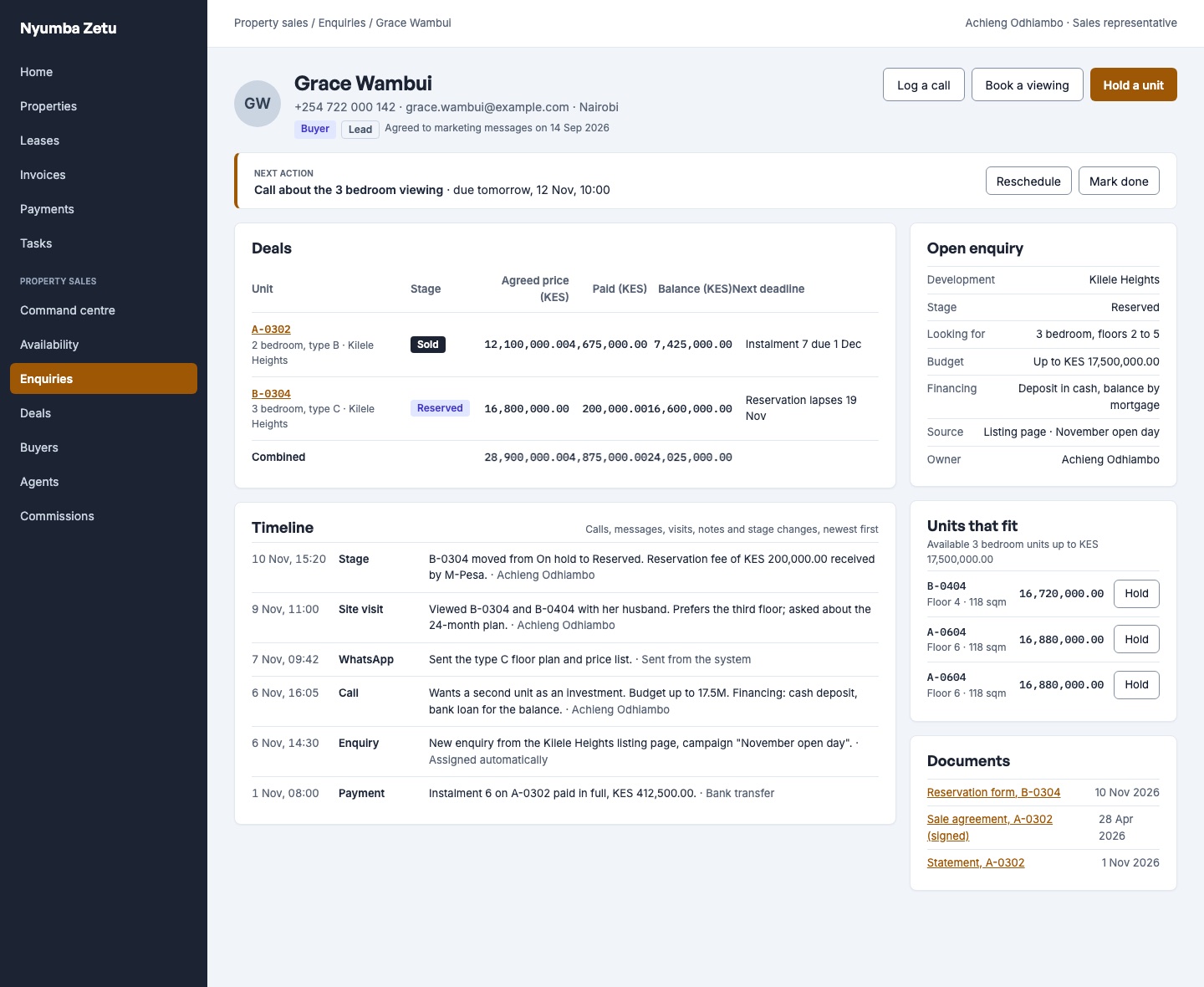
The person page (/property-sales/people/:id) shows the timeline of everything that happened
with them, their next action, their deals and units that fit what they asked for.
Who owns it: assignment and round-robin
Every enquiry has one owner, the representative responsible for it.
- Staff-recorded: the owner staff picked. If none, the next representative in turn. If the development has no representatives, the person who recorded it.
- From outside (listing page, agent, website form, WhatsApp, SMS, email, property portal): always the next representative in turn.
- Imported: the owner named in the file, otherwise the next representative in turn.
Next in turn is decided per development:
- Sales representatives come before administrators.
- Among them, the person whose most recent enquiry for this development is oldest goes first; someone who has never had one goes first of all.
- A tie is settled in a fixed order, so the same situation always picks the same person.
A representative is someone who holds Sell and has access to the development's property or to the whole organisation. Moving an enquiry to someone else needs Manage, unless it is your own or has no owner. The new owner must be a representative of the development.
Stages
| Stage | Meaning | How it gets there |
|---|---|---|
| New | Nobody has spoken to them yet. | Every new enquiry. |
| Contacted | First contact made. | Logging a call or message moves New to Contacted. |
| Viewing | They have seen, or are booked to see, a unit. | Logging a visit moves it here. |
| Negotiating | Talking price or plan. | Set by hand. |
| Converted | A unit was held or reserved for them. | Holding or reserving from the enquiry. Final. |
| Lost | They are not buying. | Mark lost with a reason. Final. |
Activities only move an enquiry forward; a note moves nothing. Staff can set any open stage by hand, backwards too. Lost reasons are price, location, financing, bought elsewhere, unreachable and other.
Activities, viewings and next actions
Log every contact on the enquiry or the deal with Add activity:
| Field | Notes |
|---|---|
| Kind | Call, message, visit or note. |
| Channel | Phone, SMS, email, WhatsApp or in person. A call defaults to phone, a visit to in person; a message must name its channel. |
| When | When it happened. Set a scheduled time to book a visit ahead: that is a viewing. |
| Outcome and summary | What came of it. A booked viewing's outcome is recorded after it happens. |
| Next action and due date | What happens next, and by when. |
| Task | Optionally raise a follow-up task with a title and due date. |
- The first next action of every new enquiry is Make first contact, due after the development's untouched-enquiry time (24 hours by default).
- Untouched enquiries are those with no activity in that time. The list flags them so a manager can see who is waiting.
- Follow-up tasks go to the enquiry's owner in Tasks, and the owner is emailed when the task is created.
- Due reminders. Every morning at 08:00 each person gets one reminder of their follow-ups and next actions due that day or overdue (up to 30 days), as an in-app notice, and by email if they have chosen it in their alert settings. It repeats each day until the item is done.
Team activity
Team activity on the Enquiries page shows, for a development and period, each salesperson's calls, messages, site visits and notes, when they last logged anything, and their overdue next actions, with the latest 25 activities. A sales manager sees the whole team; a representative sees their own.
From enquiry to deal
When the buyer is ready, the representative holds or reserves a unit from the enquiry, the person page or the Availability board. The enquiry becomes Converted and a deal begins. Continue with Reservations, offers and the deal lifecycle.