Listing page, buyer portal and agent portal Available
Property Sales has three pages for people outside your team. None needs a staff login. Each shows your logo and name.
| Page | Who | Address |
|---|---|---|
| Listing page | Anyone looking for a home | /homes/…, one per development |
| Buyer portal | Buyers, from reservation onwards | /portal/sales/home |
| Agent portal | Agents and agencies on your register | /portal/sales/agent |
Listing page
Each development can have a public listing page: its photos, the homes on offer and an enquiry form, Ask about a home.
- Publish it from Setup. In the development's Public listing section, give the page a headline, choose how prices show and what the page lists, then Publish. Setup then shows the page's address to copy or open. Pause the page takes it down; publish again to bring it back. See Developments, units and prices.
- Shown only while it is live: the listing is published, the development is active and Property Sales is on for your organisation. Otherwise the address shows nothing.
- The enquiry form asks for a name and a phone number or email. Each enquiry arrives in Enquiries with the source Listing page and goes to the next representative in turn. See Enquiries and lead assignment.
- Protected: the form is screened for bots and limited per visitor, phone and email. It never says whether someone is already known to you.
- Tracked links Built, opening soon: a link for a campaign or for an agent records the campaign on each enquiry, and an enquiry through an agent's link is credited to that agent. They cannot yet be made from the staff screens.
Inviting buyers and agents
Staff open the portal for someone with an invitation:
- A buyer: Invite to buyer portal on the deal page, from reservation until the deal is closed, or on the person page.
- An agent or agency: Invite to agent portal in the agent page's menu, for an active agent.
The invitation dialog shows the exact message first, then sends it by SMS or email. Or Make a link to copy to send the link yourself: it sends nothing, the link is shown once, and making a new one cancels any earlier unused link. Preview as buyer (or agent) opens a read-only view of what they will see, for 15 minutes.
Signing in
Buyers and agents sign in the same way, with no password:
- They open a link sent by SMS or email.
- They enter the six-digit code sent in the same message. Five wrong tries end the link.
| Lasts | |
|---|---|
| A link from a staff invitation | 7 days |
| A link the person asks for again on the sign-in page | 60 minutes |
| A signed-in session | 30 days |
A session stays signed in on that device after the tab or browser is closed, until it ends or the person chooses Sign out. Each link works once. Anyone can ask for a fresh link on the sign-in page; one is sent only if that phone or email has access now, and the page never says whether it does. A manager can revoke an agent's links and sessions at any time.
Buyer portal
Each person named as a buyer on a deal at Reservation, Offer, Sold or Completed can use the buyer portal. Joint buyers each sign in separately. When the deal is closed, access ends.
| Section | Shows |
|---|---|
| Your homes | One card per home they are buying, with the balance. |
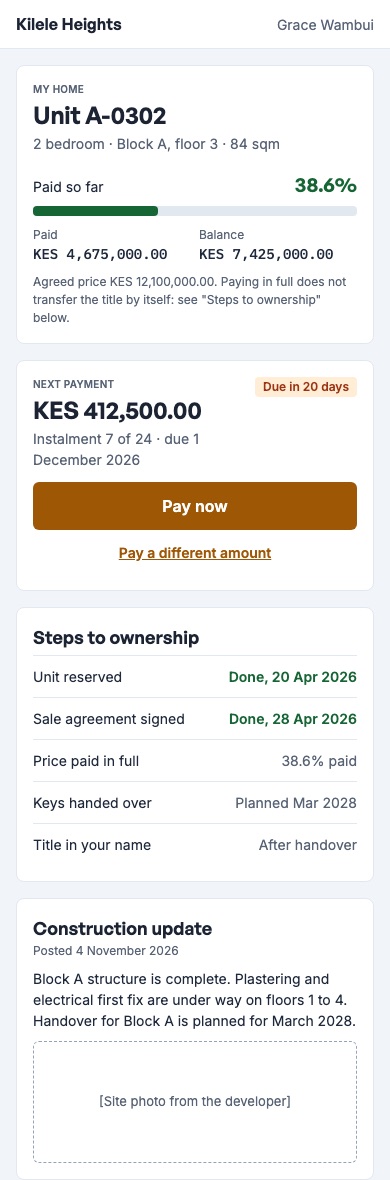
| Your home | The amount paid and owed, the next payment, the steps to ownership, the payment reference and who to ask. |
| Schedule | Every line of the payment plan and its due date. |
| Statement | Every bill and payment on the sale, with Download PDF. |
| Updates | Construction updates for their development and phase. |
| Documents | The signed agreement and the newest offer letter, once uploaded and checked for viruses. |
Paying by M-Pesa. On a bill, Pay sends an M-Pesa prompt to the buyer's phone. The payment is recorded against the sale like any paybill payment. See how a buyer pays.
The buyer cannot change anything on the deal.
Agent portal
An agent or agency on your register, linked to at least one development, can use the agent portal. Staff representatives on the register cannot. A suspended agent loses access at once.
| Tab | What the agent can do |
|---|---|
| Stock | See the units of their developments with today's price and status. Never who holds or bought them. |
| My clients | Register a client for a development, and see their own clients and how long each stays protected. |
| My deals | Hold an available unit for one of their own clients, and follow their deals: unit, stage and deadline. |
| Commissions | See their commission parts, totals and anything owed back, and download a CSV statement. |
A client registered in the portal arrives in Enquiries with the source Agent and goes to the next representative in turn, credited to the agent for the development's lead-protection period.
The agent cannot reserve, make an offer, approve anything or see another agent's clients.
Status of each part
| Part | Status |
|---|---|
| Listing page and its enquiry form | Available |
| Publish or pause a listing from Setup | Available |
| Buyer portal, including M-Pesa Pay and the statement PDF | Available |
| Agent portal | Available |
| Invite a buyer or an agent, copy their link, or preview what they see | Available |
| Your logo and name on the portals; staying signed in after the tab is closed | Available |
| Making tracked links for campaigns and agents from the staff screens | Built, opening soon |