Apps → TPS → /apps/tps Beta
The TPS app puts a tenant purchase scheme on one sidebar: purchasers, money, risk and ownership. This guide covers three of its pages. Overview says where the scheme stands and what is waiting on someone. A contract's record states one purchase in full. Unapplied credit is the queue of buyers' money that no bill has taken yet.
Overview
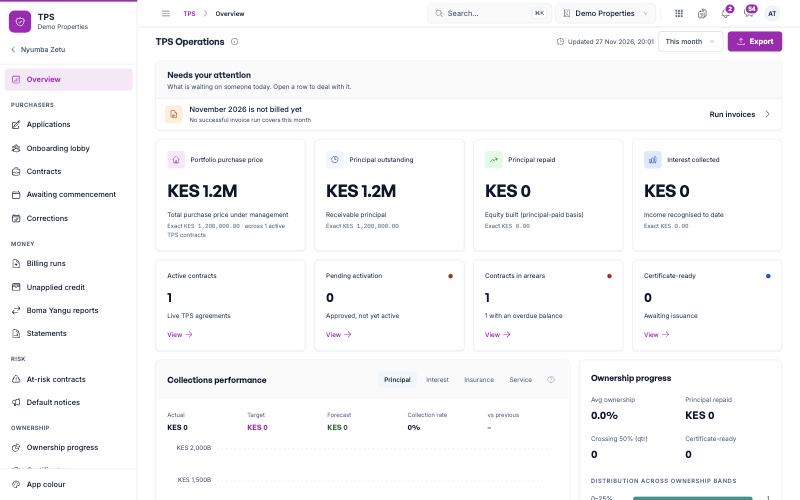
Needs your attention
Each row is something waiting on a person today. Open a row to deal with it. A row appears only when there is something to do:
| Row | What it means |
|---|---|
| Month is not billed yet | No successful invoice run covers the current month. Run invoices opens Billing runs. |
| The last invoice run had problems | The latest run made errors, with how many invoices it did make. |
| Boma Yangu payments to look at | Payments that failed, are held or need action. |
| Unapplied credit to decide | Payments with money no bill has taken. It opens Unapplied credit. |
| Contracts awaiting commencement | Billing starts only once commencement is confirmed. |
| Allocations to review | Held allocations and proposed matches. |
When nothing is waiting, the card says so.
The figures
| Card | What it counts |
|---|---|
| Portfolio purchase price | The total purchase price of the live contracts under management. |
| Principal outstanding | The principal buyers still owe. |
| Principal repaid | The principal buyers have paid, which is equity built. |
| Interest collected | Interest recognised to date. |
| Active contracts · Pending activation · Contracts in arrears · Certificate-ready | Counts. View opens the matching list. |
The exact figure, to the cent, sits under each rounded headline.
A contract's record
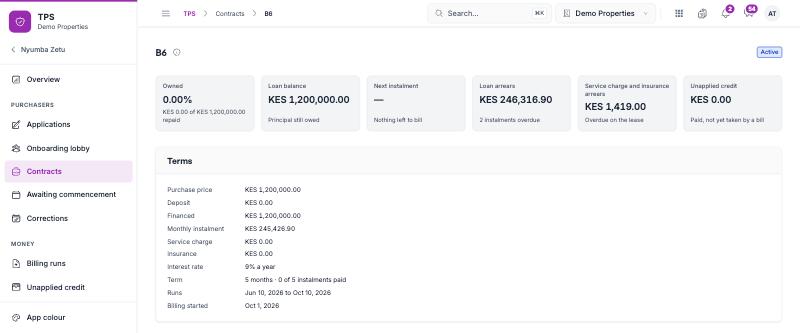
Open a contract from Contracts, or from any list that names one. The record is at
/apps/tps/contracts/<contract>.
| Card | What it means |
|---|---|
| Owned | The share of the purchase price repaid as principal, and the amounts behind it. |
| Loan balance | Principal still owed: what was financed, less the principal repaid. |
| Next instalment | The next instalment not billed yet, and when it falls due. |
| Loan arrears | Instalments billed and overdue, and how many there are. |
| Service charge and insurance arrears | What is overdue on the lease, kept apart from the loan. |
| Unapplied credit | Money the buyer paid that no bill has taken yet. |
Terms gives the purchase price, deposit, amount financed, monthly instalment, service charge, insurance, interest rate, how many of the term's instalments are paid, and the dates the contract runs and was first billed.
Instalments lists the amortisation schedule row by row: principal, interest, the instalment, what is Still due on what was billed, the balance after it, and a status (Not billed, Overdue and so on).
These figures read the same ledger as the scheme's reports. The principal repaid, loan arrears and unapplied credit on a record agree with ownership progress, the arrears report and the Boma Yangu reports for the same contract.
Unapplied credit
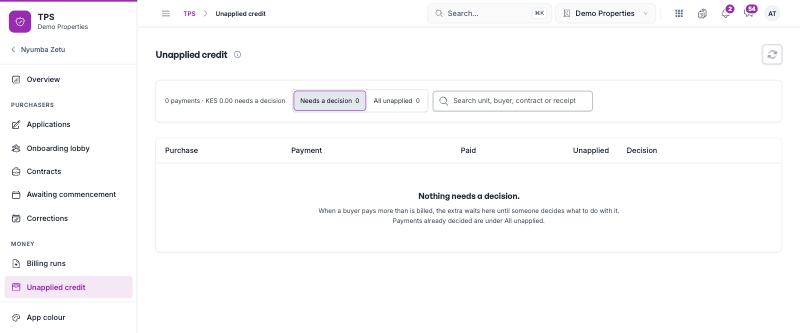
When a buyer pays more than was billed, the extra waits here until someone decides what to do with it.
- Needs a decision lists the payments nobody has decided on yet. All unapplied includes the ones already decided.
- Each row names the purchase, which links to its record, the payment, what was paid, what is still unapplied, and the decision.
- Decide (or Review, once decided) opens a panel with four choices:
| Decision | What happens |
|---|---|
| Keep as credit | The money stays on the buyer's account. Each instalment takes from it as it is billed, oldest first. |
| Pay the next instalment(s) now | The buyer's next scheduled instalments are billed early and paid from this money. |
| Reduce the loan (principal) | A balance reduction is asked for: the money pays down one loan's principal, and the rest of that loan is recalculated. A different person must approve it, and approval waits until the buyer's signed Lump Sum Payment Authority Form is attached. |
| Refund the money | A refund is asked for, paid from the bank account the payment came into. A different person must approve it, and the approval records the refund. |
The panel explains each choice before you make it.
When the panel closes, the queue is read again.